

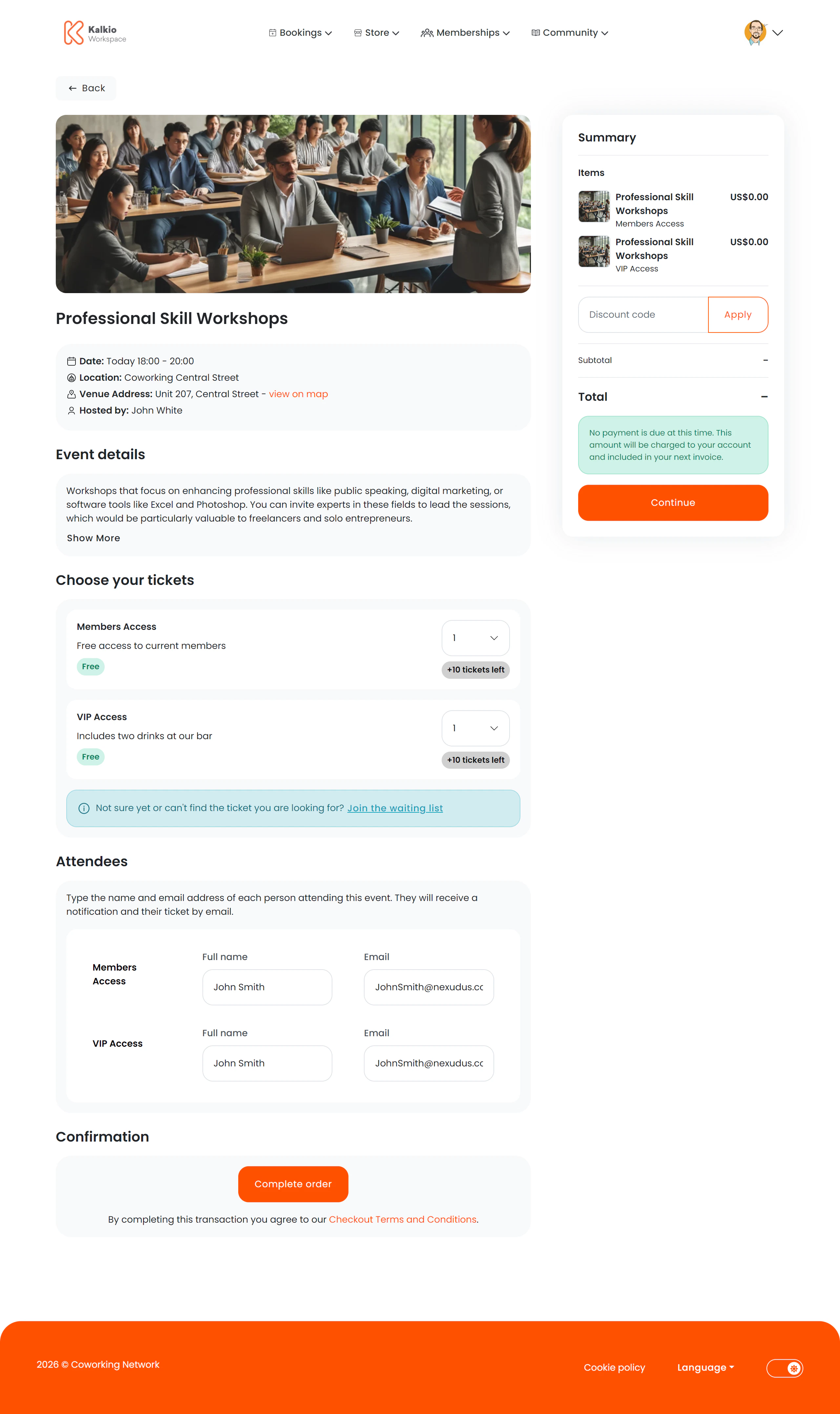
What members see
A two-column layout with event and ticket details on the left and a basket summary on the right.Event information
- Event name, image, and date/time range
- Location and venue address with a map link
- Host / organiser name
- Collapsible description — full event details that expand on demand
Ticket selection
Multiple ticket types can be listed, each showing:- Ticket name and price
- Tickets remaining — or a “Sold out” badge
- Quantity dropdown — select how many of each ticket type to purchase
Attendee information
For each ticket purchased, members fill in:- Attendee name
- Attendee email address
Waiting list
If all ticket types are sold out, members can optionally register for a waiting list.Key features
- Multi-ticket checkout — buy different ticket types in a single order.
- Per-attendee capture — collect individual attendee details for every ticket.
- Live availability — ticket counts update to reflect remaining inventory.
- Waitlist support — keep demand visible even when tickets are sold out.
Configurable sections
| Setting | Default | Effect |
|---|---|---|
| Show back button | On | Show back navigation |
| Show basket summary | On | Display the cost summary sidebar |
| Show event image | On | Display the event featured image |
| Show event description | On | Show the expandable event details |