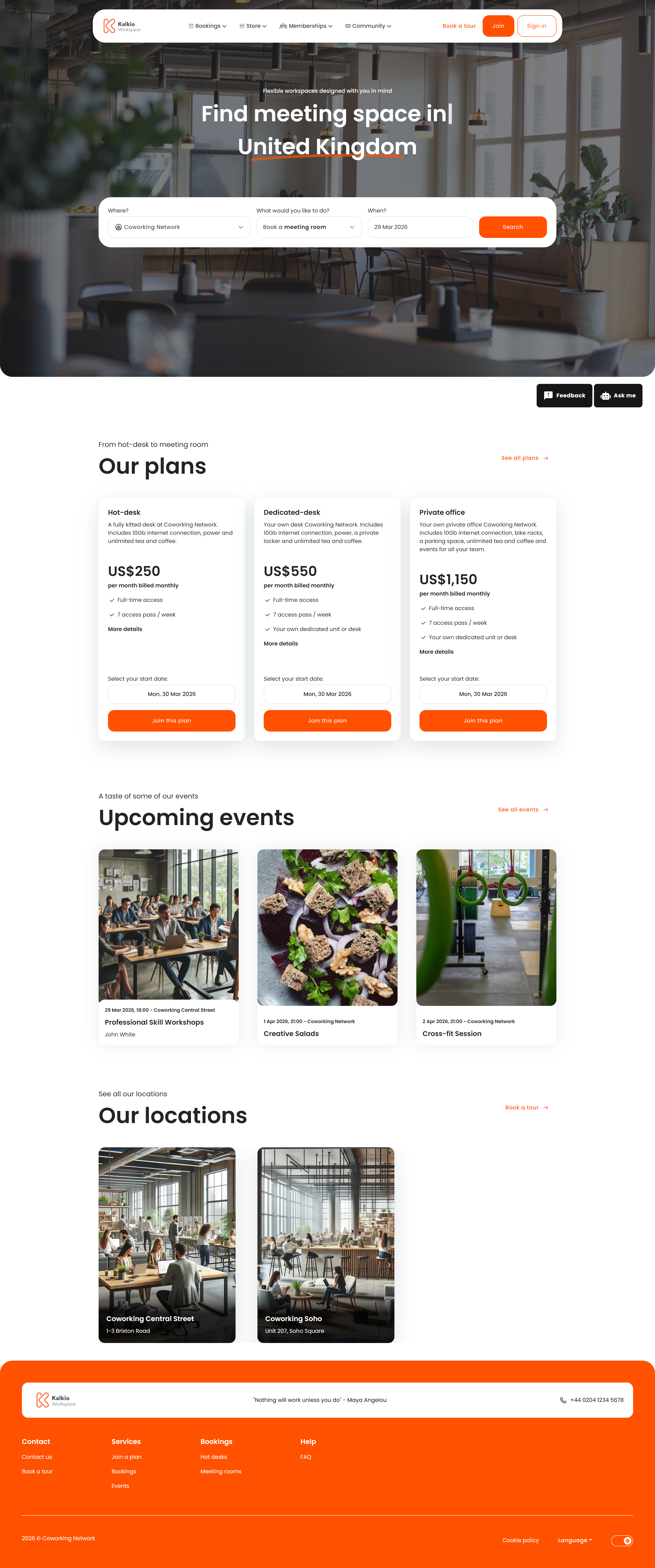
The home page is the first thing visitors see when they navigate to your Members Portal. It provides an overview of your coworking space and is designed to convert visitors into members.
What members see
The home page is built from configurable sections that you can toggle on or off from the Page Editor:
| Section | Description |
|---|
| Hero | Large banner area with headline text, sub-text, and a search box for quickly finding resources or plans |
| Plans | Displays your membership plans and time passes so visitors can compare options at a glance |
| Featured Events | Shows up to three upcoming events to drive attendance |
| Locations | Lists your business locations — useful for multi-site operators |
Key features
- Transparent navigation bar — the top navigation overlays the hero image for a clean visual effect.
- Configurable hero content — set the main heading, supporting text, and call-to-action directly from the dashboard.
- Plan display — plans are pulled automatically from your configured tariffs and time passes, including pricing.
- SEO metadata — the page title is automatically set to your business name for search-engine optimisation.
All sections are optional. Use the Page Editor in the Nexudus dashboard to:
- Show or hide the hero, plans, events, and locations sections.
- Change heading text and sizes.
- Adjust section spacing and layout.
If you operate multiple locations, the Locations section helps visitors find the site nearest to them.