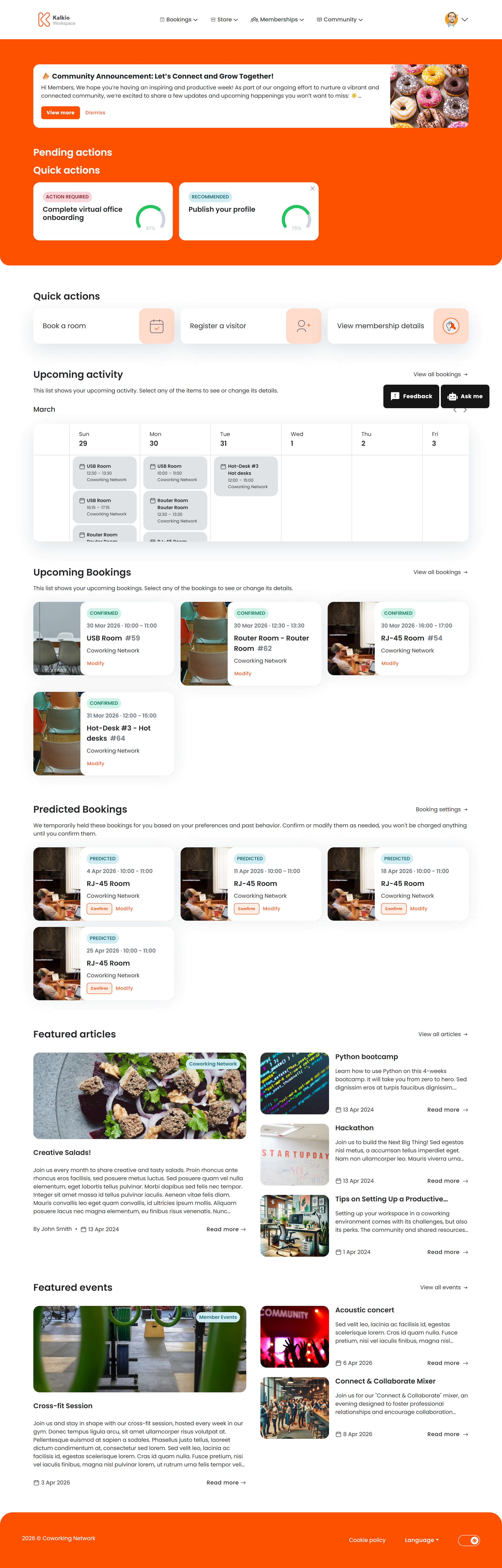
The personal dashboard is the first page members see after signing in. It provides a personalised summary of their activity and quick access to common actions.
What members see
The dashboard is assembled from configurable sections:
| Section | Description |
|---|
| Header | Personalised greeting using the member’s first name, plus a “Make a Booking” quick-action button |
| Announcements | A banner displaying location-specific announcements you have posted |
| Onboarding | Guided steps for new members to complete their profile and explore the portal |
| Weekly calendar | A visual calendar showing the member’s bookings for the current week |
| Upcoming bookings | Cards summarising the member’s next resource bookings with key details |
| Predictive bookings | AI-suggested booking slots based on the member’s usage patterns |
| Featured blog articles | Latest blog posts from your location |
| Featured events | Upcoming events displayed as a card gallery |
Key features
- Personalised greeting — addresses the member by first name.
- Quick booking — the header button sends members straight to the booking flow.
- Announcement visibility — post location news and it appears automatically on every member’s dashboard.
- Onboarding guidance — helps new members complete setup steps (can be dismissed once done).
- Predictive bookings — AI analyses past behaviour to suggest likely booking times.
Configurable sections
All sections can be toggled on or off from the Page Editor:
| Setting | Effect |
|---|
| Show announcements | Display the announcements banner |
| Show onboarding | Display the guided onboarding section |
| Show weekly calendar | Display the week-at-a-glance calendar |
| Show upcoming bookings | Display upcoming booking summary cards |
| Show predictive bookings | Display AI-predicted booking suggestions |
| Show featured articles | Display latest blog posts |
| Show featured events | Display upcoming event cards |
Use announcements to broadcast important news — maintenance schedules, new amenities, or community events. Every member sees them on their
dashboard.